Showing posts with label #FAQ. Show all posts

Sunday, 31 May 2015

How to Clean Your Keyboard with Simple Traditional Methods


The typical keyboard has been found to be so dirty it is sometimes 150 times beyond the recommended bacteria limit, meaning it’s 6 times filthier that your toilet seat. The keyboard is one of the gadgets constantly in use and attracts accidental food, liquid spillage and dust. Since you cannot live without your keyboard, cleaning it is very important if you would like to assure its life and your health.

To clean your keyboard you need a couple of cotton swabs, compressed air can or hand-held type of vacuum cleaner, a screw driver and some Isopropyl alcohol or any alcohol type of cleaning solution. Attempting the following traditional methods will leave your keyboard very clean.

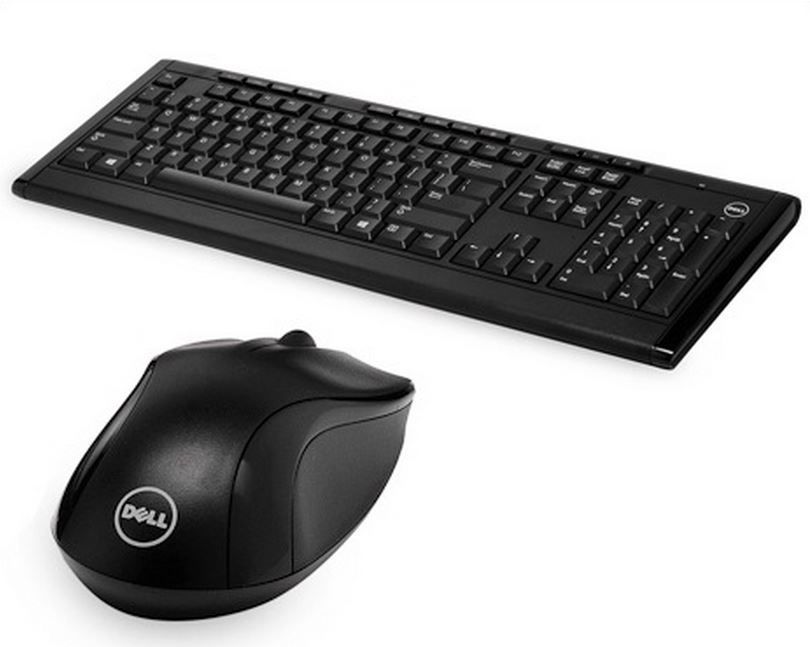
Dell Wireless Keyboard and Mouse KM 113, Available on eBay in GA's Shop
Dell Wireless Keyboard and Mouse KM113, Available on eBay in GA's Shop
 Go to GA's eBay Shop


Compressed air method


To clean the keyboard’s outer surface fast easily including the keys sides, use the compressed air can to blow the dust particles out of your keyboard. First, unplug and hold the keyboard in a comfortable horizontal position. Put the compressed air can’s nozzle or the vacuum cleaner’s inside the keyboard keys and start blowing.

Lots of the loose particles within the keyboard will be blown away. The method is very effective if you want to clean dust particles loosely hanging on the keyboard’s surface. However, it might not remove every one of the stubborn dirt attached to the keys.

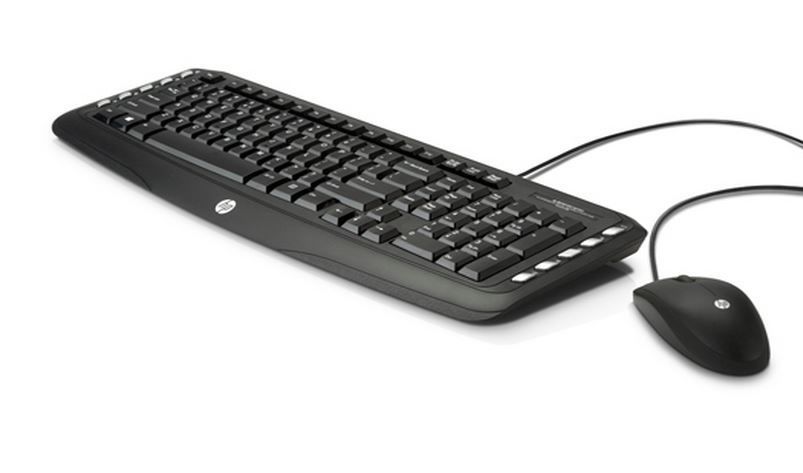
HP Wireless Classic Keyboard and Mouse LV290, available on eBay in GA's Shop
 Go to GA's eBay Shop


Isopropyl dipped cotton swabs method


Ensure your keyboard has been unplugged and all the dust particles have been blown away, perhaps using compressed air. Using the cotton swab dipped in cleaning alcohol or Isopropyl alcohol clean the surface off gently including the keyboard’s sides. Give the keyboard some time to dry. 
While the keys’ sides will be clean, including most of the keyboard, chances are lots of dust particles that have penetrated inside the keyboard keys will still be around.

HP Multimedia wired Keyboard and Mouse C2600, available on eBay in GA's Shop
 Go to GA's eBay Shop


Keys removal method


This method is perfect if liquids and food crumbs have spilled on your keyboard over a long period of time. Begin by unplugging your keyboard and using a butter knife or screwdriver to pull out the keys gently from their position. After popping out each key at a time, the dust particles will be very clear, including food particles accumulated.
Clean the dirt inside the keys and every key thoroughly prior to re-inserting it. Remember to remove the Space Bar gently since it’s the longest key and improper removal could break it off.

You can also remove every key and clean it prior to inserting; using a soap solution to clean the keys well. Do not scrub the key markings.

Once the keys are clean, let them dry for some time before you insert them back. Simply place each key in its rightful position and press it gently until it has fitted perfectly.

Note: No matter what method you use, remember not to pour any liquid inside the keyboard otherwise you might destroy its unit permanently.

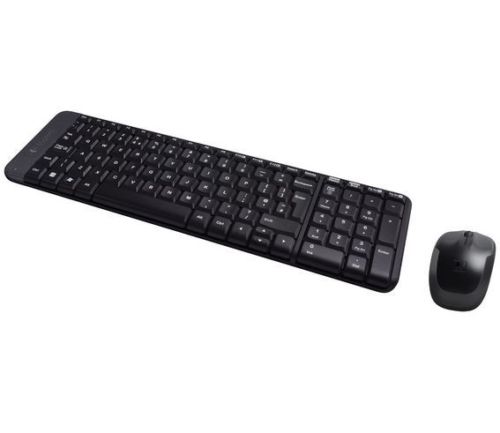
Logitech Wireless Combo Keyboard and Mouse MK220, available on Ebay in GA's Shop
Logitech Wireless Combo Keyboard and Mouse MK220, available on eBay in GA's Shop
 Go to GA's eBay Shop


We are going to look at modern keyboard cleaning methods next.


Keyboards available by brand:

Dell Wireless Keyboard & Mouse KM113
HP Wireless Keyboard & Mouse LV290
HP Wired Keyboard & Mouse C2600
Logitech Wireless Keyboard & Mouse MK220


Sunday, 15 February 2015

I just got a new smartphone. Shall I buy mobile phone insurance?


This question is already so well-researched and you can find many links on the internet which focus on the smartphone insurance issue. Yet we receive calls and emails weekly with regards to this problem. So here is a rough idea how most mobile phone insurances work and what you would be expected to pay in case of a claim. We are going to discuss what you need to pay particular attention to and how budget-friendly repairs can be useful in case your smartphone gets accidentally damaged.


A short guide for smartphone insurance


Factory Warranty


The Factory Warranty is a manufacturer’s guarantee to repair your phone or mobile device if something goes wrong with it that isn’t your fault. Of course, restrictions apply, so it’s important to check what is and isn’t covered under the warranty. Check how long it lasts for, especially when you are buying an expensive high-end smartphone or other mobile device.

Factory guarantee is legally binding and it covers your smartphone for a year with the exception of consumable electronics, which include accessories, battery and headphones i.e. small electrical goods that might have shorter life-time due to more frequent use.

This means your newly bought mobile phone is insured for at least a year and the warranty covers any mechanical or software breakdown if it isn't your fault. Rooting, Jailbreaking and unauthorised unlocking will end your warranty. Accidental damage (dropping your phone and smashing the screen) or liquid damage (spilling water or juice on your device) are not covered. They are your fault.


Mobile phone and smartphone insurance


As Factory Warranty does not cover accidental damage, theft, lost or stolen devices and smartphones which have been in contact with liquid; network suppliers and mobile phone insurance companies offer you an Extended Warranty when you buy your new smartphone and you pay for an insurance with it within the first 30 days of purchase. However what is and isn't covered by the insurance is subject to terms of the insurance policy. So always read the small print!

Do not insure old mobile phones which are inexpensive to replace.
Businessmen holding old mobile phones - Do not insure old mobile phones which are inexpensive to replace!

How does smartphone insurance really work?


Most smartphone insurance will be valid for up to 24 months or they last till your contract with the network provider expires. What does it cover? That's the small print.

Make sure you read the small print and look for answers to these specific questions:

  • Is my smartphone covered for accidental damage?
If you drop your phone and smash the screen, or you accidentally spill juice on your device, will you be covered?

  • Is my smartphone covered for accidental loss or theft? Are there exceptions?
If you lose your device or you become a victim of pickpocketing,  will your smartphone be covered? Some insurance policy says if you left your phone unattended in a public place, the insurance will not cover your loss.

  • Is there an excess fee when claiming?
Excess fee is a fee that you have to pay when you are making a claim. This usually ranges from £25 up to £100. Check in the small print how much you would pay to make your first or second claims within the 2-year-guarantee.

  • Up to how much does the insurance cover your phone?
How much they would pay in case of a successful claim.

  • Does it also cover part of your bill or only the device is insured?
Some insurance policy will cover a part of your phone bills in case of unauthorised calls. It can be pretty useful if you happen to become a victim of theft and the thief has used your phone for calls for especially if this all happens abroad. 

  • How many times can you make a claim during the warranty period?
Most phone insurance policies will allow you to claim up to twice in two years.


The most important thing to remember when you are about to purchase a mobile phone insurance is that it must cover you for the things and accidents you might need in your particular circumstances.
Keeping this in mind, it is possible that you do not even need a smartphone insurance.

No matter how pushy the phone promoting sales staff is, you are not required to buy a phone insurance. If you do not think you need one, just tell them so.

In case the pushy staff succeeded; don't worry, there is a 14 days cooling off period, when you still can step back from the insurance and all money paid will be refunded. Not much can be done after these initial 2 weeks; the insurance contract will legally bind you till its expiration date after the cooling off period. 


Smartphone insurance policy in practice


Now we are going to look at your financial investments with regards to the phone insurance and the mobile phone you just purchased.

What have you paid for your smartphone so far? What would you pay if you accidentally broke your iPhone 5 screen in the 6th month or 12th month??

As mobile phone insurance policies can vary greatly, we will look at an average premium insurance  and examine how it would work out for you on the long run. A premium insurance's price with most networks ranges from £10 to £15. Let's count with an average: £12.50 a month, which makes £300 in the next two years.

The other factor in our calculation is the current price of the device. A newly purchased iPhone 5 is around £600. As soon as it leaves the shop/factory its value will be considerably reduced by around 20-30% after a year your phone will worth 50% less i.e. during your insurance period you are insuring your phone for £600 while it is actually worth less. Not to mention that if nothing goes wrong, you are wasting another £300 for the insurance only. But you can never be sure enough, so let's look at what happens if you break your iPhone 5 after 6 months of use.

In the 6th month, you drop your smartphone and smash your new iPhone 5's LCD screen. What happens next? You will need to make a claim to receive a replacement device, payment for damage or some insurance companies use repair shops to get these faulty phones fixed usually within 4-7 days. To be able to access any of these services, mobile phone insurance policies set a so-called excess fee to pay in case of any claims. The average amount you will pay is £75 and most likely you will receive a new handset "free" unless the insurance company sends it off to the repair shop.

The average premium insurance however only insures you up to £300, so if you lose your smartphone, you're just better off buying a new one. If the damage, device, repair or anything costs more than £300 you will be required to pay the difference.
Budget-friendly smartphone, computer and laptop repairs in London - GA Repair Services logo
Budget-friendly smartphone, computer and laptop repairs in London - GA Repair Services


Budget-friendly smartphone repairs


So you have already spent £375 for a replacement phone. If you lost it, it might be a good call to claim, although you could have just bought a refurbished or used iPhone 5 for a similar price instead.

If it is a simple screen replacement, then oh boy! Budget-friendly iPhone 5 screen replacement prices range between £45 and £75. That's less than the excess fee you pay to claim your insurance.
And remember that you can only claim twice during your insured time-period.

Cheap iPhone screens are not as high quality as the original ones, but it is a budget-friendly solution for a quick replacement and they work perfectly.

Have a look at GA Repair London's budget-friendly prices here.


Shall I buy mobile phone insurance then?


Well, this clearly depends on your individual circumstances. Are you often clumsy? Do you have a long and busy history of lost or stolen mobile phones? Do you accidentally leave your smartphone in the cab's back-seat or on the table in a restaurant sometimes? Perhaps, it happens often-times? If your answer is yes to any of these questions then you might need to consider paying for an insurance.

If your answers are no then you might end up paying for something that you will never use.

The choice is truly yours.


Do you have a mobile phone insurance? Do you have a good story about insurance claims?

Share your thoughts with us. 

 For useful info, guides, tips and advice, follow this blog every Sunday.


Monday, 19 January 2015

Tips to choose the best laptop in your price range

As a freelance copywriter reviewing gadgets and electronic equipment, all I need is a word processing kind of software. Spending too much money for my requirements isn’t a good idea, as it’s been proven with my current laptop.

I just bought this laptop last year, and guess what! It looks so outdated both in looks and performance that I am even ashamed to carry it around.
Oh, boy, I spent a whole year’s savings on it, and now, I am forced to go shopping for the latest one.

Memory card and laptop battery at GA Repair North London
Memory card and battery at GA Laptop Repair, London

Well, here are a few important hints I learned from Techies when shopping for a Laptop:

Purpose:


the most important part of a purchase is the purpose. What do you want to use the laptop for? Is the laptop a home-, business-, travel- or gaming-laptop? Different uses of the laptop require different strength and allow specific weaknesses in build, design, durability and performance. As I am a student myself, I will tell you what a student like me should have in a laptop suitable for a student’s purposes.

Memory:


A 4GB RAM memory has become the very basic requirement, RAM is your laptop’s short term memory and the bigger the size of RAM the better it is. For basic requirements and needs like I have or a student has 4 GB should work, though a real good configuration would be an 8 GB RAM. Also, the disk space should be a minimum of 500 GB, as we need to save data, information, CVs, photos and documents, etc.

Memory card at GA Repair in North London (Wembley & Haringey)


Processors:


A processor helps your work progress fast and easy. The higher the speed of the processor, your laptop delivers the work faster.  Quad-core processors have become the minimum requirement for a laptop with decent functionality. Although we have to note that manufacturers in general don’t build better than a quad-core processor into a laptop as it greatly affects the battery life and the overall heat-release of the laptop.

Battery:


The advantage with laptops is that they are portable, mobile and can be carried around; as such you may not have power sockets wherever you go. Hence, battery life plays a very important role. Battery back-up of 7-8 hours is considered real good, though, for a basic configuration, 5-6 hours of back-up is also good.

Laptop battery at GA Repair London

Display:


The minimum screen size, measured diagonally for an average configuration laptop is 15 inches. As a student, or a professional  who uses laptop only  part-time, you can still get a decent laptop within a budget of around £500 with the above given configuration.


Storage & Hard-drive:


As technology evolves and improves every passing day, it gets difficult for us to strike a balance amongst the perfect products: the equipment that fulfills our needs; keeps up with latest technology and design aesthetics; and our financial constraints. It becomes extremely important to get the best out of your investment, as the life of these mean machines is getting shorter and shorter as technology advances.

If you need advice on how to choose your laptops, tablets or mobile phones, consult a professional before making your purchase.

GA Repair Services offers free help, assistance and quotes. Contact us in our London offices; visit our website’s contact page to leave a message.


Friday, 16 January 2015

How to Get Your Laptop Battery an Extended Lifetime


Are you a travelling businessman, a sales executive or a self employed professional that needs to work on the go, stay connected to the business contacts, prospects, and your family at the same time?

Laptops are for you then, but does your laptop frequently run out of power, rendering you a not-so-social being? :-)

GA Repair ads in North London about extending your laptop battery's lifetime
How to improve your laptop battery's lifetime

Here are a few tips on better usage of battery for an extended life


  • Charge the battery enough: Your battery needs enough power stored into it, so it can give you a maximum back up of 5-6 hours. So keep the battery charged, until it shows 100% charged. If you are forced to charge the battery frequently for back up or not getting enough back up, consider replacing the battery. Always go for a Lithium battery for better performance and better life span.

  • Set the appropriate power option: Change your laptop settings to optimize the power usage, reduce the time limit for the laptop to go-to sleep, when you are not around and using it.

  • Use Bigger RAM: Using RAM to run programs requires less power than taking the information from the hard disk memory. It is always advisable to have at least 2GB of RAM.

  • Clean the Battery Components: At least once in two months or so, remove the battery and clean the components , may be with alcohol, this makes sure that the transfer of power between laptop , and battery is smooth.

  • Turn-off Accessories & features not in use:  Services such as Bluetooth, Wi-fi are better disabled when not in use. Also, do not set maximum brightness for screen display as it consumes too much power.

  • Avoid Surfaces that heat –up: Do not use Pillows, etc as base for laptops while working, as they heat up and consume more power. Rather use cooling pads as surface for laptop.

The desktop computers lacked mobility factor being bulky, and the need to connect different components’ to be functional rendered them immovable. Most importantly they needed to be plugged into the wall socket for power supply.

The greatest advantage with laptops is that you can work even on the go, as it has power stored within the battery fitted inside. Hence it becomes extremely important to ensure your battery has enough power stored into it. Also, ensure proper maintenance and efficient use, so your battery performs better and has an extended life span.

Memory card & laptop battery with GA Repair business cards and contact details
Memory card and laptop battery with GA Repair business cards

Monday, 12 January 2015

Tips to Salvage your Water Damaged Laptops and Phones


Oh Boy, that video was actually meant to make you laugh and bring some smiles on your face, say Cheez! Or say Geez?!


Still not laughing, has that video made you pensive? Well, to be honest, it does kind of scares me too! As I frequently fear similar accidents and damages to my most possessed equipment laptop, Tablet, Android Phone.

Though, it is difficult to prevent and avoid our loved ones (toddlers to pets) manhandling our equipment, causing potential damages to them.

Man placing his laptop near a bathtub full of water in liquid damage guide by GA Laptop Repair in London
Never place your laptop or device near liquid or a bathtub full of water!


Here are a few tips on salvaging your gadgets from liquid damage


  • Curiosity kills the cat; yes it does and did to me. As soon as I emerged out of the swimming pool, I was pushed into on a company outing; I tried repeatedly to turn the phone on curiously to see if everything with it was fine. Switching on the phone immediately only severs the damage.

  • It is highly recommended that the power supply, cords, battery be removed immediately, as water conducts electricity it may cause short-circuit.Once you remove the battery, also detach other parts that can be detached such as SIM cards, SD Memory Cards as well as keyboard, etc. and attempt to dry them well. 

Man splashing in bathtub holding a laptop in water damage guide by GA Laptop Repair in London
Remove all cords and battery to avoid getting electrocuted
  • Make sure every single drop of water is dried.  You can use a dry towel or compressed air by can. It's better than your mouth for this purpose.

Man drying liquid damaged laptop with white fluffy towel in how to save your liquid damaged laptop guide by GA Laptop Repair in London
Dry it out, use a dry towel, preferably paper towel, not a fluffy one
  • Wait at least 24 hours to power on and restart the equipment. 

Man trying to switch on laptop after severe water damage to the device in how to save your liquid damaged laptop guide by GA Laptop Repair in London
Don't try to switch it on for at least 24 hours!
  • If it still doesn’t start after waiting, drying for 24 hours, there may still be water inside the equipment, in which case, it is highly recommended that you take it to an expert service centre. GA Repair London can help you liquid damaged mobile phones and laptops. Get in touch.

Laptop suffers severe water damage, man holding laptop which is leaking in how to save your liquid damaged laptop guide by GA Laptop Repair in London
In case of severe water damage, just call GA Repair: 07842 316225

Difficulties with water damaged device repair


The advice any one can give you is to prevent than repent and go for repair. Still, to err is human and we keep making those mistakes dropping the phone in the toilet or spilling water on the laptop is common.

Though some of these incidents actually make us laugh at our own stupidity, we might be in for some serious trouble. As these equipment contain very valuable, precious and sensitive information and data, and losing them is a huge risk.

Well, the painful visit to the street corner technician with our dead equipment is our only option, yet there is no guarantee of longevity to the equipment. They may expand the life span for a short duration, so you can recover your valuable data or postpone a sudden expenditure, but it is rare that a liquid damaged mobile phone will fully operate even if all the faulty parts have been replaced. Why is that?

When water or liquid gets inside your equipment, it causes damage which cannot be seen right away. The motherboard and other parts essential for operation might get corroded.
Even if we replace the corroded parts, as these devices comprise of lots of tiny parts, there's a 90% chance that other parts have been affected by the liquid damage and the electrical technician will not see these at the time of repair.

What are the implications?


Avoid placing your device close to any type of liquid. If accidents happen - they will - take your device to the repair centre close to you, but be aware that the fixed equipment will only function fully temporary. It can take up to 12 weeks for the corrosion to appear but perhaps it will never appear at all. You can't be completely sure about that.

Be prepared to fully replace your device. Get a new one or buy a refurbished version of your old equipment. This will help you with copying back all your data to your smartphone or laptop.

If you have more concerns, get in touch with GA Repair, London.

Have an accident free weekend.

GA Laptop & Mobile phone Repair Services in North London (Wembley & Haringey)

Wednesday, 1 October 2014

Fight Virus: Protect your Data and Privacy

Malware protection


Virus protection software has been created in order to protect a user’s computer against virus attacks such as Trojan horse, worms and other harmful software code which has the ability to crash a computer. Virus protection software’s also known as anti-virus software which helps you to remove any harmful virus code which has already entered your computer system.

GA Smartphone Repair London helps fighting computer viruses
How to fight against Computer Viruses?

Difference between a virus, worm and a Trojan horse


Though a virus, worm and a Trojan horse are all malicious code which can harm your computer, they are not the same in context.

Virus

  • A computer virus is almost similar to a human virus. It can attach itself to a computer file or any software program which will ultimately get transferred to other computers when the particular file transfer takes place. When the virus reaches a new computer system through a program or file, it infects more files in its new destination.

Worm

  • Worms have the capability to cause more harm to a computer system as it can be spread from one system to another even without any human action. The alarming factor about a worm is that it can multiply in the system within a short span. While a virus is sent only as a single entity from computer to computer, a worm has the ability to send thousands of copies which can prove to be fatal to the infected system.

Trojan horse

  • A Trojan horse is the most harmful type of code, because it initially appears to be a safe software program but ends up causing irreversible damage to the infected computer system. In this way, users are deceived into opening these infected files. As with viruses, a Trojan horse also varies in its severity.

How to protect your computer system from malware and virus attacks


It is very important to protect your computer system from all types of malicious code such as virus, worms and Trojan horse. This is because these codes have the ability to cause immense damage to your system by deleting important files, compromising confidential information, preventing a system from booting etc.

Download reliable anti-virus protection software

  • The first step towards virus protection is to download and install effective anti-virus software. These programs frequently check the computer system for any malicious files and remove them immediately before it is able to cause any damage to the system.


Be careful when opening suspicious links and emails

  • Malicious programs are usually transferred through email messages from computer to computer. Never open links or mails from sources which cannot be trusted.

Block pop-up messages in your browser

  • Pop-up messages appear on top of a web browser. These messages can also contain harmful code. Use a pop-up blocker to prevent the appearance of pop-ups.

Use a firewall

  • A firewall can be very useful in informing the user whenever a suspicious activity or a threat is seen to the computer system. Once the user receives an alert, he/she can take the necessary actions for protecting the system.

Sometimes, your system gets so old and out-dated that even the most effective malware removal software can let your computer get infested by malware. If this happens, the best thing you can do is to take your computer to your local engineer and get some friendly and professional help with virus removal.


Here, at GA Computer Repair London, we can also help you with malware and virus removals and to keep your data safe from malicious software attacks.

The most interesting facts about computer viruses

Free virus removal services included with every repair we undertake till the end of  2015.

Indeed, you can easily win free virus removal services now, click here to take part in our monthly Gift Raffle draw.

Good luck and keep your computer safe from virus attacks.

Tuesday, 30 September 2014

Convenient Door-to-Door & On-Location Repair service available in London

Is your computer cleaned and updated regularly?


Personally, I work on a PC and I rarely disassemble it. I don't know much about hardware and I'm more of a "dumb user" when it comes to personal computers. But I know how to use professional software and  I find my ways in social media, too.
My computer has started to produce much noise lately and, I take it, this is due to dust and neglect. Though I use this PC every day and I clean its screen, speakers and other peripherals regularly, the parts inside my computer are rarely cleaned and refreshed. It has been cleaned ages ago and by now I feel a growing pressure to get it done professionally.


I work with GA Repair, but I deal with ads, management and the "soft" side of the business. Luckily, Andras is here to help me with this.

How about you? Do you clean the parts, like fans, inside your computer regularly? Do you have someone taking care of this?

Personal computers, especially older ones, are quite big in volume so it's difficult to send them by post. If you don't have a car to drive to the nearest repair centre, you can either take it by cab or public transport, alternatively you can call a computer technician to your home. This is kind of convenient, but if you are similar to me, then you won't like strangers working around the house. We all need our privacy uninterrupted when possible.

If your PC doesn't get routinely checked and cleaned, dust will cause over-heating, noise and other physical or hardware problems to your computer.

Can you hear the noise the fan makes? It's time for a health-check.


So here's the solution. Book a door to door service with GA Repair in London. This is the most convenient service available around North London.


Every weekday 6:00 pm - 9:00 pm and weekends 4:00 pm - 8:00 pm, GA Repair runs a door to door service, which includes driving to your address provided, picking up your PC and returning it back to you at a convenient appointment.

The Pick-up and On-location fee is £15 in London (within 15 miles) and an additional £1 fee applies for every mile commenced outside our fifteen-mile Pick-up zone. Repair and parts' costs are not included.

Can you imagine a more convenient way of getting your PC repaired or regularly cleaned and health-checked?


Andras comes to your chosen address, picks up the computer, laptop or phone and brings it back to you at a convenient time (within service hours) in cleaned state and working condition.

He will not stick around for the repair and your PC will reach you in 48 hours from the pick up time. Quick, friendly and reliable service which runs its trial period now.

Additional free services & Our monthly Gift Raffle draw.


Halloween is coming soon and GA Repair offers free malware removal (or factory reset if preferred) with every computer & laptop repair to its newsletter subscribers.

Indeed, every month you can win free virus removal service if you are subscribed to  GA Repair.

To subscribe, simply click here and earn multiple chance to win by following us in social media.
Door-to-door and on-location laptop, mobile phone and smartphone repair in North London
GA Laptop & Smartphone Repair Services in London

Monday, 29 September 2014

Protect your Mobile Phone from Viruses and Malware

What is a Mobile Phone Virus?

A mobile phone virus is a vicious software program code, just like a computer virus precisely designed and adapted for the mobile phone environment and has been produced to spread from one exposed device to another.

Mobile phone with virus detected alert designed by GA Smartphone repair in North London
Illustration: Mobile phone virus detected on smartphone
The numbers of mobile malware and worms are invariably on the rise. It has become an alarming menace to the wireless phones and PDA networks. It has become increasingly burdensome to ensure the safety and security against electronic attacks.


Mobile devices are mostly afflicted by the following types of malevolent software programs:


  • Trojan, a malicious program only gets activated through user interaction and once it is activated it affects and damages the device badly by tainting several other applications or the phone itself.
  • Worm, transmitted through SMS or MMS and it doesn’t need any user interaction to get activated. This program emulates itself endlessly and spread to other devices.
  • Spyware, typically malicious as it spreads user’s personal or sensitive data without user’s assent or approval.
Some of the malicious programs are called Cabir, Ikee, Gingermaster, Duts, DroidKungfu, Skulls and unfortunately there are many others.


How to avoid problems regarding viruses and protect your phone against malware?


The best way to protect your device is not to click or accept any unknown messages that you are not fully aware of. Apart from that, you can maintain several things to diminish the chances of actually installing a virus:
  • Download a reliable antivirus application in your Smartphone.
  • Once you download an antivirus application, remember to scan your mobile often.
  • If your phone has Bluetooth functionality, make sure that the Bluetooth functionality is switched to either “Hidden” or “Invisible” mode until and unless you explicitly need it to be visible.
  • You can make your device password protected, as this helps to prevent the use of data stored in your phone.
  • You should download any content from a trusted or a well-known source to be on the safer side.
  • The antivirus application of your phone should be kept updated all the time.
  • If your computer or laptop is virus infected, don’t connect your phone to it or share anything until and unless you’re sure that the system is safe.


Here, at GA Repair London, we can also help you with malware and virus removals and to keep your data safe from malicious software attacks. Our virus removal services are inclusive with all repairs till the end of 2015.

Indeed, you can easily win free virus removal services now, click here to take part in our Gift Raffle game.

Good luck and keep your mobile phone safe from virus attacks.

Thursday, 25 September 2014

Malware - The Enemy of your Computer in Disguise


Malware - the enemy of your computer in disguise poster designed by GA Laptop repair in North London
Malware - the enemy of your computer in disguise poster


Malware is a term used for software designed basically to gather information or damage someone’s computer without their knowledge. In short malware is the abbreviation used for the term ‘malicious software’. 

Generally, it is the mind that has created the software and not the features that make a software malware. The reason behind the creation of the malware, with a new one popping up almost daily, is to make money fast, which is an offence in the cyber world and attracts punishments (both in monetary penalties, as well as sentences to be spent in prison.)

Malware Dangers


Though all malware are dangerous as they damage your PC, but there are some special types of malware that are extensively dangerous. Some of the viruses are known to be malicious and they have the ability to delete a file and at times the entire drive, like the ‘Overwriting viruses. On the other hand the ‘Ransom-ware Trojan’, not only encrypts the data on your file, but the culprit actually asks for ransom from the distressed victim in return of the decryption key.  


Symptoms to Confirm a Virus Attack on your Computer


Generally, your computer starts misbehaving. Advertisement pop-ups will keep disrupting, your settings change on their own and you cannot re-set them, your web browser has components you did not install or your PC is running extremely slow and crashes a lot.

Act Fast


If you feel your PC is misbehaving or something is wrong and you did not do that, than you should take action. Launch your Windows Task Manager, go to Process Tab and check for any new/unwanted file (you did not install). If any pop-up pops warning you or asking for credit card details for any software, your PC is infested.

Do not go to your old anti-virus and begin checking your PC, by now understand it has failed in keeping malware out, so don’t bother using them.  Take it to the nearest Computer repair expert to find a solution. Use your Windows Safe Mode, it protects your PC from most of the malware out there.

In order to keep your laptop and data safe from viruses, it is highly recommended that you take your device for regular laptop health check-ups. Malware removal services usually include a comprehensive laptop-health assessment, which means not only we check your laptop’s system-health but we also check the physical parts of your computer and clean it thoroughly from dust and pollution.  This will make your laptop run faster, heat up slower and provides a greater lifetime to the physical parts of the laptop.

Here, at GA Repair London, we can also help you with malware and virus removals and to keep your data safe from malicious software attacks. Our virus removal services are inclusive with all laptop and computer repairs till the end of 2015.

Indeed, you can easily win free virus removal services now, click here to take part in our Gift Raffle draw game.
 
Good luck and keep your laptop safe from malware attacks.

Think you got a virus? Win free malware removal poster, IT network engineer doctor in white gown virus scanning laptop
Enter for a chance to win free gifts and repair services every month!


Wednesday, 24 September 2014

Tips for Internet Security and your Safety

Has your computer, laptop or tablet slowed down in performance?
Do you see any vital information missing from your storage disks on these equipments?
Or you often get irritating pop-ads on your screen from nowhere?

Well, it is time to act and act fast. You may have to consider taking your equipment to the nearest computer repair expert to cleanse it of the virus that has sneaked into it.

IT Network engineer in Wembley and Haringey are inspecting a laptop for malware attacks in white gown at GA Computer Repair in North London
Enter for a chance to win gifts and free services every month!

Main sources of virus attacks:


A virus can be transmitted to your computer via many sources such as:

Email Attachments


These are the most common sources, and also the easy sources; some time back I received an email- with an attachment -that looked tempting enough to open, when I did open it, there was nothing in it. Few days later, I started getting complaints from my friends about the spam emails they were getting from my email id. It was then I realized that attachment contained a Virus.

TIP: beware of such emails, especially with attachments, never open any email with attachments form unknown sources.

Hacked or Cracked Software (pirate versions)


Such software, obviously is illegal, and is offered by mean people who have wrong motives. When you download or purchase such software for a low cost or free, it harms your computer.

TIP: Always download, purchase genuine software from reliable sources.

Downloads from the Internet


Internet is a great source of information; There are many files, downloads available which help disseminate and share information for public at large. This poses a great threat as most of these files may contain virus in various forms such as malware, spyware, etc that harm your computer.

TIP: Have a reliable, trustworthy anti-Virus software Installed so such stealth virus sneaks can be avoided.

Virus is actually a piece of code written for the purpose of intruding your computer without your knowledge, with the intention of controlling your device remotely. These programs sneak into your computer when you install legit software. Sometimes you get warning and notifications, though not all the time.

In order to keep your laptop and data safe from viruses, it is highly recommended that you book your laptop for regular device health-check-ups. Malware removal services usually include a comprehensive laptop-health assessment, which means not only we check your laptop’s system-health but we also check the physical parts of your computer and clean it thoroughly from dust and pollution.  This will make your laptop run faster, heat up slower and provides a greater lifetime to the physical parts of the laptop.

Here, at GA Repair London, we can also help you with malware and virus removals and to keep your data safe from malicious software attacks. Our virus removal services are inclusive with all computer and laptop repairs till the end of 2015.

Indeed, you can easily win free virus removal services now, click here to take part in our Gift Raffle competition.
 
Good luck and keep your laptop safe from malware attacks.